


LongPlus
2.9208.00 Reviews
App Specs
- Version
- 24.1.1.20240120
- Updated On
- License
- Free
- Downloads
- 50,000+
- Developer
- CREATIVE SECURITY LIMITED
- Categories
- Video Players & Editors
- Platform
- Android
Screenshots
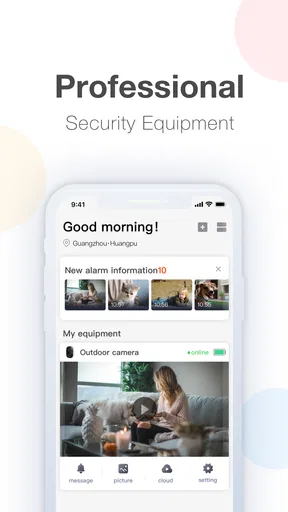
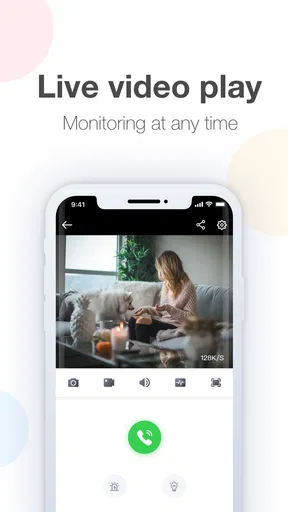
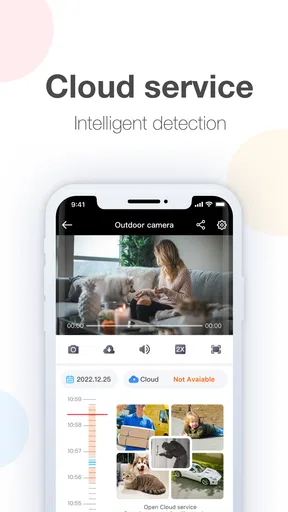
 Analysis by AppCompare
LongPlus is the kind of app you install for one clear reason: you want to look at a connected camera from your phone instead of opening a separate monitor. I reviewed it as a video monitoring app, and its purpose is refreshingly focused. It is made by CREATIVE SECURITY LIMITED and sits in the Video Players & Editors category, although it feels less like a conventional video editor and more like a remote viewing tool for a compatible security setup.
My first impression is that the app makes the most sense when it is treated as one part of a camera system, not as a general-purpose video player. If your camera or monitoring hardware is designed to work with LongPlus, the app can give you a practical way to check a live view while you are away. If you are simply looking for a player for clips saved on your phone, a home-video editor, or a broad smart-home dashboard, this is probably the wrong direction.
How LongPlus fits into everyday monitoring
The central experience is peer-to-peer video monitoring. In ordinary terms, that means the app is intended to connect you with a compatible camera and show what it sees in real time. That focus changes how I judge it. I am not looking for creative filters, trimming tools, social sharing, or a library of entertainment videos. I am looking for a quick path from opening the app to checking a room, entrance, shop floor, or another monitored space.
A realistic use case is a small business owner stepping away from a counter during a delivery. Instead of asking someone nearby to check the entrance, the owner can open the LongPlus setup and see the current camera view. At home, the same basic workflow could be useful for checking a doorway while waiting for a parcel or taking a quick look at a room. The value is not in watching continuously; it is in having a convenient remote check when the situation calls for it.
That also explains an important limitation: the app’s usefulness depends heavily on the camera arrangement behind it. A monitoring client cannot compensate for an incompatible device, an incomplete setup, or a camera placed where it cannot provide a useful view. Before relying on it, I would test the complete chain in the exact place where it will be used. A live image that works on a desk is not automatically a dependable routine when the phone is away from the local network.
The current experience is deliberately narrow
I like the narrow purpose because it keeps the app from pretending to be something it is not. LongPlus is free to install, has an Everyone content rating, and supports Android devices running version 5.0 or later. Those details make it approachable for older compatible phones, which can be useful if you want to leave an inexpensive handset available for occasional monitoring rather than using your newest device.
At the same time, an older supported operating system does not guarantee that every modern phone will feel equally smooth. The app’s current version is 24.1.1.20240120, so I would keep the application updated on the device used for monitoring and avoid judging the whole setup from one quick launch. The practical test is whether the camera appears consistently, the live view starts without repeated attempts, and the phone remains usable while the app is open.
Worth Reading Before You Choose

EA SPORTS FC Mobile 26 Is a Bigger Football Game, but It Takes Time

Flipboard Shows What News Apps Must Do Beyond the Feed

Switching to Android Auto Means Rethinking Your Driving Routine

Google Calendar Makes a Crowded Week Easier to Manage

Ludo King Makes the Most of the Minutes Between Plans

Baby Panda World Brings Quick Play to Modern Phones, but Its Game Library Feels Busy
The app has an average rating of 2.9 from about 720 ratings, with around 208 written reviews. I read that as a signal to keep expectations realistic rather than as an automatic rejection. Monitoring clients often receive poor feedback when pairing, network conditions, or device compatibility create friction, even when the basic viewing idea is useful. A middling score tells me to test the exact hardware combination before making LongPlus part of a safety-critical routine.
What the version information tells existing users
The listed release date is June 26, 2019, while the current version identifies a later maintenance state. That combination suggests a product that has continued through revisions rather than remaining frozen at its original launch. It is reasonable to see the current build as the version to evaluate today, not the first release, but I would avoid assuming that a newer version automatically changes the whole experience.
For an existing user, the main benefit of staying current is simple: the installed build is the one most likely to reflect the developer’s present compatibility work and corrections. The developer is CREATIVE SECURITY LIMITED, and the current version gives users a clear reference point when troubleshooting. If a camera behaves differently after an update, noting the exact version before contacting support or changing the setup can save time.
There is also a useful habit I would recommend after updating: check the camera connection at home before depending on it elsewhere. Open the live view, close and reopen the app, and try the same check over the connection you normally use when away. This is not glamorous, but remote monitoring fails most inconveniently when people discover a pairing or access problem only after they need the image.
How it affects a regular monitoring routine
LongPlus works best when you build a small routine around it. I would place the camera in a position that answers one specific question, such as “Is the entrance clear?” or “Is the equipment area unattended?” A wide but poorly aimed view can be less useful than a narrower view that clearly shows the point you actually need to inspect.
For repeated checks, I would avoid leaving the app open all day unless there is a genuine reason to do so. A quick open-and-check workflow is easier on the phone and less distracting. It also encourages better judgment: use the app to confirm a situation, then act on what you see, rather than treating a live feed as a substitute for being physically present.
Another practical tip is to keep the monitoring phone’s role simple. If it is also handling navigation, calls, games, and heavy background tasks, a quick camera check can become less predictable. A spare Android phone that meets the minimum requirement may be a sensible dedicated viewer, especially for a family member or small workplace that wants a straightforward screen available without tying up a primary handset.
For households, I would make sure everyone who may use the viewer understands what the camera covers and when it should be checked. The app provides access to a visual feed, so the wider responsibility lies with the people operating the camera. Avoid pointing a camera at spaces where people reasonably expect privacy, and do not interpret a temporarily unavailable view as proof that nothing is happening.
Where it compares well with usual alternatives
Compared with a generic video player, LongPlus is more useful for live camera access because its purpose is connected monitoring rather than playback of ordinary files. A normal player may handle downloaded clips better, but it will not replace a client designed to communicate with a compatible camera system.
Compared with a broad smart-home app, LongPlus may feel more direct if your only task is viewing a camera. A larger home-control platform can be preferable when you want lighting, locks, sensors, automations, and cameras in one place. The trade-off is that a general platform may add layers you do not need, while a dedicated client can keep the monitoring task more focused.
Compared with a camera maker’s newer all-in-one application, the better choice depends on the hardware you already own. If your device is built around LongPlus, switching apps may not be practical or supported. If you are choosing equipment from scratch, I would compare the entire ecosystem instead of selecting an app based only on its free installation. Setup clarity, device compatibility, remote reliability, and the way recordings are handled matter more than the label in the app store.
LongPlus also differs from a cloud photo or video service. It is not the place I would choose to organize family recordings, edit footage, or share finished videos. Its strength is immediate access to a monitoring view. That specialization is helpful when it matches your need and limiting when it does not.
Costs, access, and the decision to test first
The app is free, but it includes in-app purchases ranging from $0.49 to $148.99 per item. That is an important distinction for anyone comparing it with completely free viewing tools. I would install it and understand which part of the camera workflow is available before committing to any purchase. The presence of optional purchases means the total cost may depend on the connected service or features you choose, so the free download should not be treated as a promise that every part of a complete monitoring arrangement costs nothing.
My advice is to test the basic path first: install the app, connect the intended camera, view the live image, and repeat the check from the location where you will normally use the phone. Then decide whether the arrangement justifies any paid option. This approach is especially important for a small shop or shared household, where an unexpected purchase is less troublesome than discovering later that the workflow does not suit the people who need it.
The Everyone rating makes the app broadly accessible from a content perspective, but that should not be confused with universal suitability. A child may be able to install it, yet camera access is still an adult responsibility in many homes and workplaces. I would keep account and device management with a trusted person and explain clearly who is allowed to view the feed.
Remaining gaps I would consider before relying on it
The biggest gap is not necessarily a missing button; it is the uncertainty that can exist between the app and the hardware. A monitoring client can feel excellent with one compatible camera and frustrating with another setup. That is why I would not promise myself that the experience will be effortless until the actual camera has been tested through the actual network conditions.
I would also be cautious about treating a live view as a complete security solution. The app’s stated role is viewing real-time video. That is valuable, but a viewer alone does not replace sensible physical security, a clear response plan, or someone who can act when the image shows a problem. If your requirement is continuous recording, advanced alerts, multi-brand device management, or detailed evidence handling, compare LongPlus carefully with a system built specifically around those priorities.
Another limitation is the learning curve created by a focused but hardware-dependent app. A person who expects to open it and immediately browse videos may wonder why it does not behave like a familiar media player. The category name can create that expectation, but the actual use is closer to a camera client. I would explain that distinction before recommending it to a less technical relative.
The rating also suggests that convenience may not be consistent for every user. I would not ignore that warning, particularly if the camera is needed for a business, a vulnerable family member, or a location that cannot be checked easily in person. Run several checks at different times, including one after the phone has been idle, and keep an alternative way to verify the location if the feed becomes unavailable.
What I would watch as the app evolves
Since the current build is 24.1.1.20240120, I would pay attention to future updates that affect connection stability, device compatibility, and the speed of reaching the live view. Those are more meaningful improvements for this app than cosmetic changes. A monitoring client earns trust through repeatable access, so any evolution should be judged by whether the everyday check becomes less fragile.
I would also watch how clearly the app communicates paid features and the relationship between the viewer and the connected hardware. Transparent explanations help users decide whether the free version is enough and prevent confusion when a camera setup involves additional services. For someone evaluating LongPlus today, those details are worth checking during installation instead of assuming that every camera function is included automatically.
Existing users should note the current version before updating and keep a simple record of whether their usual camera checks still work. That is particularly useful in a shared environment: if several people rely on the same view, one person can verify the setup after an update rather than leaving everyone to discover a problem separately. It is a small operational habit, but it turns software maintenance into something manageable.
My recommendation for the right kind of user
I would recommend LongPlus to someone who already has compatible monitoring hardware and wants a dedicated way to inspect a live camera from an Android phone. It is also worth trying for a small home or workplace where the main requirement is a focused viewing client rather than a large smart-home ecosystem. The free entry point and support for Android 5.0 or later make testing relatively approachable, provided the camera connection is suitable.
I would skip it if you want a polished video editor, a universal player for local clips, or one app that controls devices from many manufacturers. I would also look elsewhere if a camera feed is mission-critical and you cannot tolerate experimenting with compatibility. In those cases, a complete system with clearly matched hardware and software may be the safer choice, even if it costs more or offers more functions than you need.
My final view is measured but positive for the narrow job it is designed to do. LongPlus is not an entertainment app dressed up as a security tool; it is a focused client for checking real-time video from a compatible setup. Its free installation, current maintenance version, and straightforward purpose make it worth testing, while its average rating, possible purchase costs, and dependence on the surrounding camera system argue against blind trust. Use it as a practical viewing link, test it under real conditions, and keep a backup plan when the camera truly matters.
Pros
- Natural-looking filters enhance portraits without heavy editing.
- Useful tools for reshaping
- skin retouching
- and facial adjustments.
- Simple interface makes common edits quick to access.
- Supports creative effects for social media photos and videos.
- Preview changes easily before saving the final result.
Cons
- Some advanced features require a paid subscription.
- Aggressive edits can make faces look noticeably artificial.
- Export options may be limited in the free version.
- Frequent promotional prompts can interrupt the editing workflow.
- Privacy details should be checked before uploading personal photos.
FAQs for LongPlus
What is LongPlus and what can I use it for?
LongPlus is a mobile video-editing application designed for creating and customizing short-form videos. It typically provides tools for trimming clips, adding music, applying filters and effects, inserting text, and adjusting the overall presentation of a project. It may be useful for social-media creators and casual users, although the exact features and available content can vary depending on your device, app version, and region.
Is LongPlus free to download and use?
LongPlus can generally be downloaded without an upfront charge, but users should check the current store listing before installing because pricing models may change. Some tools, templates, effects, or other premium options can require in-app purchases or a subscription. It is also worth reviewing whether exported videos include watermarks and whether any trial period automatically changes into a paid plan.
Does LongPlus require an internet connection?
An internet connection may be needed for downloading LongPlus, accessing online templates, loading music or effects, synchronizing content, and receiving updates. Basic editing of media already stored on your phone may work offline, but this depends on the version and the specific feature. If you plan to edit while traveling, open the app beforehand and confirm which resources remain available without mobile data or Wi-Fi.
Is LongPlus safe to install and what permissions might it request?
Before installing LongPlus, download it only from an official Google Play or Apple App Store listing and verify the developer name, ratings, reviews, and recent update history. A video editor will normally need access to photos, videos, and possibly audio files so you can import and export projects. Review every permission request carefully, and avoid granting access that does not seem necessary for the features you intend to use.
Will LongPlus work on my Android or iPhone, and can I share edited videos?
Compatibility depends on your phone model, operating-system version, available storage, and the current requirements listed in the app store. Video editing can use considerable memory, especially when processing high-resolution footage, so older devices may experience slower previews or exports. After editing, LongPlus may allow you to save the result locally or share it through supported social platforms, but available export resolutions and formats should be checked in the app.


